Getting started with GitLab feature flags in Python

Asset Info
CreatorN/A
Registration TimeLoading...
RegistrarGitLab
Capture TimeLoading...
GeolocationN/A
File TypePNG
Source TypedigitalUpload
Details
Abstract
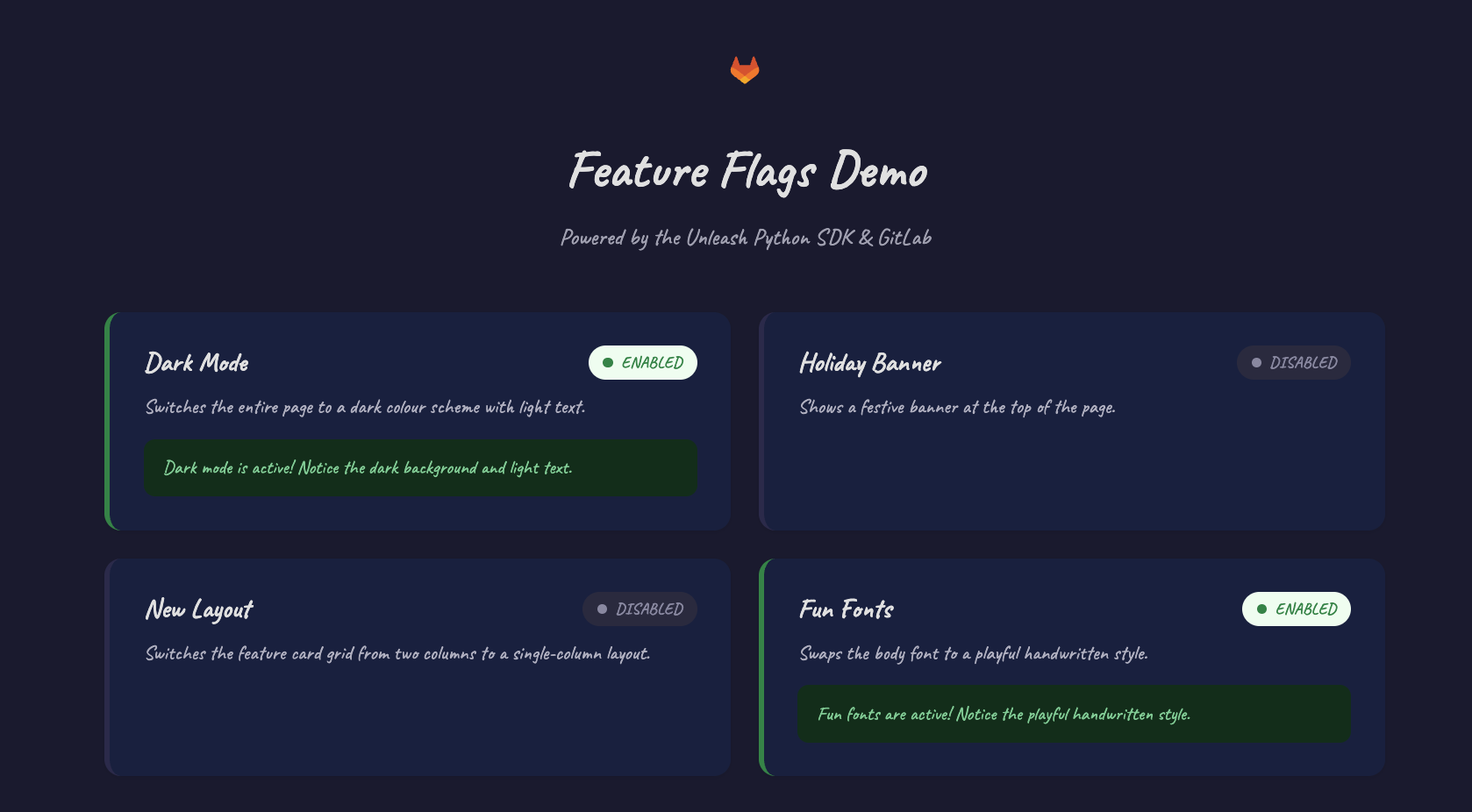
You've spent weeks building a new feature. It passes every test, the code review is done, and it's ready to ship. So you deploy it and within an hour your inbox is full of bug reports. The feature works fine for most users, but something about production traffic you didn't anticipate is causing failures for a subset of them. Now you're scrambling to roll back, writing incident reports, and managing the PR fallout.Feature flags prevent exactly this. They let you decouple deployment from release: push code to production whenever it's ready, then control who actually sees the new feature by flipping a toggle in GitLab. Start with your QA team using a "User IDs" strategy, then switch to a "10% percent rollout," then flip to "All users" when you're confident. If something goes wrong at any point, you turn it off in seconds. No redeployment, no hotfix, no bad press.This tutorial walks through a working Flask application that reads GitLab feature flags through the Unleash Python SDK. A complete, runnable version of the code is available at gitlab.com/omid-blogs/gitlab-feature-flags-demo. Clone it into your own group or workspace, and you'll have live feature flag control in minutes.By the end, you'll understand how the integration works and have a template you can drop straight into your own projects.What you'll needA GitLab project (Free, Premium, or Ultimate) with feature flags enabled. This is where you'll create and manage your flags. To enable it, go to your project and navigate to Settings > General > Visibility, project features, permissions and make sure the Feature Flags toggle is on.The demo repo forked into your own GitLab namespace, then cloned locallyHow GitLab feature flags work under the hoodGitLab exposes an Unleash-compatible API for every project. That means any Unleash client SDK (Go, Ruby, Python, JavaScript, and more) can connect directly to GitLab without a separate Unleash server.On startup, the SDK fetches all flag definitions, then re-fetches on a configurable interval (the demo uses 15 seconds). Every call to is_enabled() evaluates locally against the cached configuration with no network call per flag check. That makes flag evaluation near-instant and resilient to transient network issues.Here are the steps to take to integrate GitLab feature flags into a Python Flask app using the Unleash SDK.1. Set up your GitLab project and clone the demoYou'll need:Your own GitLab project to host the feature flagsThe demo repo cloned locally to run the appFork or clone the demo repoGo to gitlab.com/omid-blogs/gitlab-feature-flags-demo and fork it into your own GitLab namespace. This gives you a personal copy of the project where you can manage your own feature flags. Then clone it locally and open it in your favorite IDE:git clone https://gitlab.com//gitlab-feature-flags-demo.git
cd gitlab-feature-flags-demo
What's inside the repo.
├── app.py # Flask app + Unleash SDK integration
├── requirements.txt # Python dependencies
├── .env.example # Template for required environment variables
├── .gitignore
├── templates/
│ └── index.html # Web UI template
└── static/
└── styles.css # Styling
2. Create your feature flags in GitLabOpen your own GitLab project and navigate to Deploy > Feature Flags, then click New feature flag. Create the following four flags, setting each status to Active with a strategy of All users.dark_mode — Switches the page to a dark color scheme.holiday_banner — Shows a festive banner at the top of the page.new_layout — Switches the card grid to a single-column layout.fun_fonts — Swaps the body font to a playful handwritten style.Tip: A flag must be Active and have at least one strategy to evaluate as enabled. Without a strategy, the SDK treats the flag as disabled even if it's marked "Active."Understanding strategies"All users" is a simple on/off toggle, but GitLab supports several more out of the box:Percent rollout (recommended): Gradually roll out to a percentage of users based on user ID, session ID, or randomly. This is the most flexible option and the one to reach for first.Percent of users: Enable for a percentage of authenticated users. Less flexible than Percent rollout since it only works with logged-in users.User IDs: Enable for specific user IDs only, great for internal testing with a named group.User list: Enable for a predefined list of users.All users: Enable for everyone.Strategies are where feature flags get really powerful. Start with your QA team using a User IDs strategy, switch to a 10% percent rollout, then flip to All users when you're confident. All from the GitLab UI, no code changes required.3. Get your Unleash credentialsOn the Feature Flags page, click Configure in the top-right corner. You'll see two values:API URL: https://gitlab.com/api/v4/feature_flags/unleash/Instance ID: A unique token scoped to your projectCopy both values. You'll pass them to the app as environment variables. Note that the Instance ID is read-only. It can only fetch flag state, not modify anything, but still treats the Instance ID as a secret to prevent information disclosure.4. Set up the project locallyThe README has the full setup walkthrough, but the short version is:pip install -r requirements.txt
Then set your credentials. You can do this one of two ways:Option A: Using the .env file (recommended)The repo includes a .env.example file. Copy it and fill in your values:cp .env.example .env
Open .env in your editor and replace the placeholder values with your credentials from Step 3:UNLEASH_URL=https://gitlab.com/api/v4/feature_flags/unleash/
UNLEASH_INSTANCE_ID=
UNLEASH_APP_NAME=production
Then export them:export $(grep -v '^#' .env | xargs)
Option B: Export directly in your terminalexport UNLEASH_URL="https://gitlab.com/api/v4/feature_flags/unleash/"
export UNLEASH_INSTANCE_ID=""
export UNLEASH_APP_NAME="production"
Never commit your .env file to version control. The .gitignore in the repo already excludes it, but it's worth knowing why: your Instance ID is a secret and should stay out of git history.Three environment variables drive the entire integration:VariableRequiredDescriptionDefaultUNLEASH_URLYesGitLab Unleash API URL for your project—UNLEASH_INSTANCE_IDYesInstance ID from the Configure panel—UNLEASH_APP_NAMENoEnvironment name, matches flag strategiesproductionUnleashClient is the key dependency. It's the official Unleash Python SDK that handles polling, caching, and local flag evaluation so you don't have to build any of that yourself.5. Understand the applicationBefore running it, read through app.py. Here are the key patterns worth understanding so you can replicate them in your own projects.Initializing the SDKunleash_client = UnleashClient(
url=UNLEASH_URL,
app_name=UNLEASH_APP_NAME,
instance_id=UNLEASH_INSTANCE_ID,
refresh_interval=15,
metrics_interval=60,
)
unleash_client.initialize_client()
No personal access tokens, no credentials hardcoded in source. The app exits immediately with a clear error message if either required variable is missing.Checking a flagdef is_flag_enabled(flag_name):
return unleash_client.is_enabled(flag_name)
Because the SDK caches flag definitions in memory, is_enabled() returns instantly with no network roundtrip.Gating real behavior behind flagsThe index route builds a feature dictionary, evaluating each flag and passing the results to the template:features = {}
for flag_name, config in feature_configs.items():
features[flag_name] = {
**config,
'enabled': is_flag_enabled(flag_name)
}
return render_template('index.html', features=features)
The template uses those values to conditionally apply CSS classes and render UI elements. dark_mode toggles a body class, holiday_banner shows or hides a banner element entirely. Open templates/index.html to see how it's wired together.Note that index.html also auto-refreshes every 30 seconds via a small JavaScript snippet, so you can watch flag changes take effect without manually reloading.Passing user context for targeted strategiesWhen you're ready to move beyond All users and use Percentage rollouts or User targeting, pass a context object to is_enabled():unleash_client.is_enabled(
'new_layout',
context={'userId': current_user.id}
)
The SDK handles consistent hashing for percentage rollouts automatically. No math required on your end.6. Run the apppython3 app.py
Visit http://localhost:8080. You should see all four feature cards showing their current enabled/disabled state.7. Toggle flags in real timeGo back to Deploy > Feature Flags in GitLab and toggle one of the flags. Try dark_mode or holiday_banner for the most visible effect. Wait about 15 seconds, then reload the page. The card updates to reflect the new state, and if you toggled dark_mode on, the entire page switches to a dark theme. Toggle it back off, wait, reload, and it snaps back instantly.This is the core value of feature flags: You control application behavior from GitLab without touching code or redeploying.Why the Unleash SDK instead of the GitLab REST API?For an app that evaluates flags on every request, the SDK is the clear winner. It's faster, simpler, and the Instance ID it uses carries no permissions beyond reading flag state. That's a much smaller security footprint than a PAT.REST APIUnleash SDKAuthenticationRequires a Personal Access Token with broader project permissionsUses only the Instance ID, read-only, scoped to flag state, no PAT neededFlag evaluationNetwork call per checkEvaluates locally from cached configLatency per checkNetwork round-tripNear zero (in-memory)Strategy supportManual parsing requiredBuilt-in support for percentage rollouts and user ID targetingRate limitsSubject to GitLab.com API rate limitsSingle polling connection per app instanceTroubleshootingProblemFixApp exits with ERROR: UNLEASH_URL and UNLEASH_INSTANCE_ID...Set both env vars. See .env.example.All flags show as disabledCheck that the flags exist in GitLab and have an active strategy. Then wait 15 seconds for the SDK to refresh.Changes in GitLab don't appearThe SDK polls every 15 seconds. Reload the page after a short wait.A local IP address doesn't workYour OS firewall may be blocking Port 8080. Use localhost:8080 instead.A note on rate limits in productionThe 15-second polling interval works well for development and small deployments. With all clients polling from the same IP, GitLab.com can support around 125 clients at a 15-second interval before hitting rate limits. If you're building a larger production app, consider running an Unleash Proxy in front of your clients. It batches requests to GitLab on behalf of all your instances and dramatically reduces upstream traffic.Security considerationsdebug=False is already set in the demo: Keep it that way. Flask's debug mode exposes an interactive debugger that allows remote code execution.Keep dependencies updated: The requirements.txt pins specific versions. Enable GitLab Dependency Scanning in your CI/CD pipeline to stay on top of vulnerabilities.Use environment variables for credentials: Never hardcode the Instance ID or any tokens in source code. The demo's .env.example shows the right pattern.The Instance ID is read-only: It can only fetch flag state, not modify it. Still treat it as a secret.SummaryThis tutorial covered the full lifecycle of integrating GitLab feature flags into a Python application: creating flags with the right strategies, retrieving Unleash credentials, initializing the SDK, evaluating flags locally in Flask, and toggling behavior in real time without a redeployment.The entire integration requires one dependency (UnleashClient), three environment variables, and a single method call (is_enabled()). No separate Unleash server, no personal access tokens, no complex infrastructure.Feature flags are one of the most practical tools available for reducing deployment risk. The ability to instantly disable a broken feature, or progressively roll one out from a targeted user group to a percentage to everyone, without touching a deployment pipeline, delivers outsized value for minimal setup. The demo repo provides a working foundation to fork and adapt for any project.ResourcesDemo project on GitLabGitLab Feature Flags documentationUnleash Python SDK on GitHubUnleash SDKs (all languages)html .default .shiki span {color: var(--shiki-default);background: var(--shiki-default-bg);font-style: var(--shiki-default-font-style);font-weight: var(--shiki-default-font-weight);text-decoration: var(--shiki-default-text-decoration);}html .shiki span {color: var(--shiki-default);background: var(--shiki-default-bg);font-style: var(--shiki-default-font-style);font-weight: var(--shiki-default-font-weight);text-decoration: var(--shiki-default-text-decoration);}
LicenseN/A
Used Byabout.gitlab.com...
Mining PreferenceN/A
Integrity Proof